
Record & Rewatch TT Live TKREC
GREC: Screen RecorderSocial
4.551.00 Reviews
- Version
- 1.3.1
- Installs
- 50.00K
- Age Rating
- Teen
Screenshots
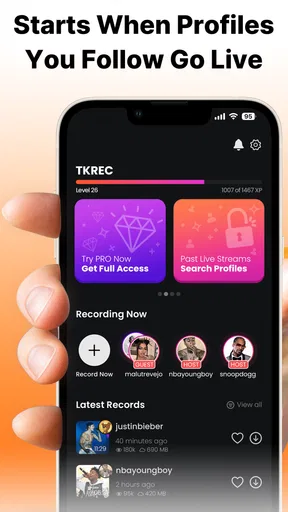

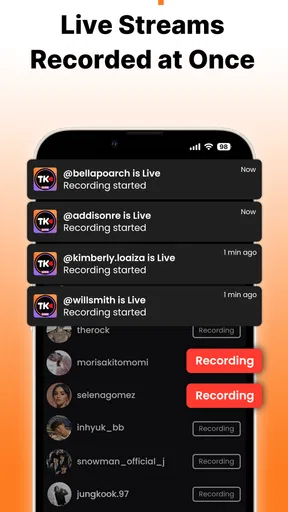
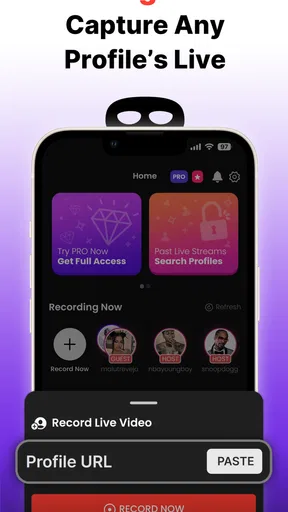
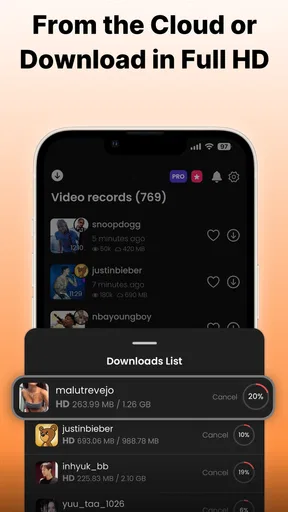
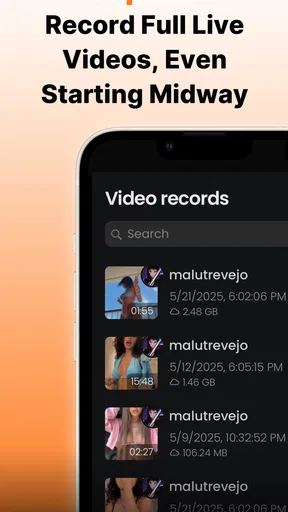
Our Review of Record & Rewatch TT Live TKREC
 Analysis by Appyee
I spent time with Record & Rewatch TT Live TKREC as a social app built around one very specific habit: saving live streams so I can return to them later. That focus makes it more useful than a general screen recorder when I am following a live broadcast and do not want to rely on memory, a replay window, or the hope that the creator will post the same material again.
The first thing to understand is that the app’s value is closely tied to connectivity. It is not simply a tool I open whenever I want to capture something on my phone. The live stream still has to reach the device, the recording has to run while the broadcast is playing, and the saved result depends on the phone completing that process properly. When the network is stable, the workflow feels straightforward. When the connection becomes unreliable, the app cannot magically restore missing parts of a broadcast.
How the live-stream workflow feels in everyday use
My most natural use case is a live session that happens at an inconvenient time. I might be commuting, preparing dinner, or already watching something else when a creator I follow starts broadcasting. With a live-stream recorder, I can treat the broadcast less like a one-time appointment and more like something I can revisit when I have the attention for it.
That sounds simple, but the timing matters. I would not start recording casually and then forget about the phone for hours. A long capture uses storage, keeps the device busy, and leaves more room for interruptions. I prefer deciding what part of the live stream I actually need: a conversation, a demonstration, a performance, or a particular announcement. This makes the resulting file easier to find and reduces unnecessary recording.
The app’s social category is a good fit because the subject is not private video production in the usual sense. It is about keeping up with live content and making it available for later personal viewing. I see the strongest appeal for people who regularly miss broadcasts because of schedules, time zones, or inconsistent availability.
There is also a useful distinction between recording and archiving. I would not treat every capture as a permanent library item. Live streams can be long, and a collection can become difficult to manage if I save everything. A better routine is to record only broadcasts that have a clear reason to be revisited, then remove files that no longer matter. That small habit makes the app feel much more practical on a phone.
Why connection quality changes the experience
A stable connection affects more than whether the live stream opens. It also shapes what I am able to record. If the broadcast pauses, drops quality, or stops loading, the recording reflects that interruption. The app can capture what appears on the screen, but it cannot replace a section that never arrived on the device.
This is why I would begin an important recording only after checking that the live video is playing smoothly. Starting immediately during a loading moment is an easy mistake. Waiting for the stream to settle gives the capture a better chance of beginning with usable content rather than a frozen screen or a loading state.
Network changes are another practical concern. Moving from a strong home connection to mobile data, entering an elevator, or passing through an area with weak coverage can interrupt the viewing experience. For an especially important live session, I would stay in one place with dependable reception instead of starting the recording while travelling. That is not a glamorous tip, but it is probably more valuable than any promise of convenience.
The key trade-off is simple: this app makes live content easier to revisit, but it cannot separate recording quality from streaming quality. A smooth source usually produces a smoother viewing experience later; a disrupted source remains disrupted in the saved result.
Using it in mobile situations
The phone is both the strength and the limitation here. I can respond to a live broadcast wherever I happen to be, without moving to a desktop setup. That suits short, spontaneous sessions and makes the app relevant to people who watch live content primarily on mobile devices.
At the same time, mobile conditions are less predictable. Notifications, incoming calls, battery-saving behavior, screen locking, and accidental touches can all interfere with a recording session. I would prepare the phone before starting: close anything unnecessary, make sure there is enough free storage, and avoid placing the device somewhere it may be disturbed. These are ordinary precautions, but they matter more when the broadcast will not be repeated at a convenient time.
I also would not assume that a long recording is harmless simply because the app is free to download. Extended use can be demanding for a phone, especially if the device is already warm or busy. If I only need a particular segment, recording that segment is a better mobile workflow than capturing an entire evening.
For a quick example, imagine I am on a lunch break when a creator begins a live product demonstration. I can watch the opening, decide that the useful section is longer than my break, and record the remainder for later. Once I return to work, I would stop the capture rather than leaving the phone running indefinitely. This approach saves attention, storage, and network usage while still solving the original problem.
What happens when something goes wrong
The most important recovery skill is not a hidden button; it is checking the result before assuming everything worked. After a recording ends, I would open the saved video and inspect the beginning, middle, and end. A file can exist while still containing an unwanted loading screen, a gap caused by a connection change, or an incomplete ending.
If the stream stops unexpectedly, I would first separate the problem into two parts: did the broadcast disappear, or did the recording stop? Reopening the live session may help with the first situation, while restarting the capture addresses the second. Trying to continue without checking can leave me believing I saved more than I actually did.
For important content, I would use shorter recording segments rather than one enormous file. This creates a more manageable recovery path. If one segment is interrupted, I lose that portion instead of risking the entire session. It also makes it easier to identify which part needs to be recorded again if the broadcast is still available.
There is a downside to this approach: multiple clips require more organization. I would give them meaningful names or place them in a clearly labeled folder if the phone allows it. Without that small step, a useful recording can become difficult to recognize among unrelated screen captures.
Another realistic limitation is that the app depends on what is visible during capture. If the live stream is covered by a notification, an unexpected screen transition, or another interruption, that may become part of the recording. I would therefore avoid interacting with other apps during the session. A dedicated phone or a second device is unnecessary for most people, but it can be worthwhile when the broadcast is genuinely important.
Keeping mobile data under control
Recording does not automatically make a live stream economical. The video still has to be delivered to the phone, so watching and recording over mobile data can consume a meaningful portion of a plan. I would reserve longer captures for a dependable Wi-Fi connection when possible, especially if the purpose is simply to watch later rather than to save a short, urgent moment.
This is also where the app’s free entry point needs a little context. It costs nothing to install, but the listing includes optional in-app purchases ranging from $1.99 to $69.99 per item. I would not buy anything simply because I wanted to test the basic recording workflow. First I would decide whether the free experience fits my routine, then examine any purchase screen carefully before confirming it.
Data-conscious use is mostly about planning. I would avoid recording a broadcast while the phone is switching between networks, stop when the relevant section ends, and review saved files so I do not keep duplicate captures. If a live session is already available as a replay through the original service, I would compare that option with recording it. A replay may be easier to manage, while TKREC is more useful when I specifically need to preserve what I saw during the live event.
Storage deserves the same attention as data. Long videos can fill a phone faster than expected, and a full device can create problems beyond this app. I would periodically remove failed attempts, duplicate clips, and broadcasts I have already watched. Keeping only the sections I value turns the app from a dumping ground into a practical personal archive.
Who will appreciate it most
I think this app is best for people who regularly miss live broadcasts but still want a simple way to revisit them. It can suit viewers with changing schedules, students who cannot attend every stream, and fans who want to keep a particularly useful live explanation for later reference. The focused purpose is its advantage: I do not have to build a complicated recording setup around a single mobile habit.
It is also useful for someone who prefers watching in one sitting later. Live chat and real-time reactions can be part of the appeal, but not everyone can participate at the scheduled moment. Recording gives that person a chance to catch up, although it naturally does not recreate the live social experience.
I would be more cautious recommending it to someone who wants professional video capture, detailed editing, automatic organization, or guaranteed recovery from network failures. A conventional screen recorder may offer a broader set of controls, while a platform’s own replay feature may be cleaner when the creator keeps the broadcast available. TKREC makes the most sense when the specific goal is recording and rewatching live content on a phone.
I would also skip it if I rarely watch live streams. In that case, a dedicated recorder may add another app without solving a regular problem. The narrow focus is helpful only when the habit is real.
What the app’s current position suggests
GREC: Screen Recorder is the developer behind the app, which is currently at version 1.3.1 and works on Android 7.0 or later. That broad system compatibility makes it approachable for people who are not using a recent phone, although the actual comfort of long recordings will still depend on the device’s storage, battery condition, and general performance.
The app has an average rating of 4.5 from around 1.8 thousand ratings, with over 50 thousand installs. Those figures suggest that the concept resonates with a meaningful group of users, but I would interpret them as a starting signal rather than proof that every phone and network setup will behave identically. Recording live video is particularly sensitive to circumstances outside the app itself.
It carries a Teen content rating, which feels appropriate for a social tool connected to live broadcasts that may vary in subject matter. I would still remember that the app does not control everything shown in a live stream. Parents and younger users should consider the content of the broadcasts they choose to watch, not only the recorder’s label.
The app was released on June 12, 2025, so I see it as a relatively recent option rather than a long-established utility. That makes it sensible to keep expectations practical: test it with an unimportant short stream before trusting it with a one-time event. A small trial can reveal how the phone handles the recording, where files appear, and whether the workflow suits the user’s habits.
My verdict on connectivity and daily usefulness
After looking at the complete workflow, I find Record & Rewatch TT Live TKREC appealing because it addresses a specific frustration without pretending that live video is always dependable. Its strongest moment is a stable connection, a clear reason to save the broadcast, and a user who is willing to check the result afterward.
I would use it selectively rather than continuously. Before recording, I would settle on a reliable network, protect the phone from interruptions, check storage, and decide when to stop. Afterward, I would inspect the file and delete failed or unnecessary captures. Those steps are not burdensome, and they make the difference between a useful saved stream and a disappointing blank or incomplete recording.
The app is free to start, supports older Android versions, and has enough interest from users to deserve consideration. Still, its value depends on the live-stream situation more than on the app alone. If I need editing tools, polished replay management, or strong guarantees around interrupted connections, I would look at a broader recorder or the original platform’s replay system instead.
For the right viewer, though, the purpose is clear. When a live stream matters but the schedule does not cooperate, this social recording app can turn a missed moment into something I can watch later. I recommend it as a focused mobile solution, provided you treat network stability, data use, storage, and recovery checks as part of the experience rather than afterthoughts.
Verdict
Strengths of Record & Rewatch TT Live TKREC
- Quickly saves TikTok LIVE streams for later viewing.
- Simple recording workflow with minimal setup required.
- Useful for keeping memorable moments from live broadcasts.
- Recorded content can be reviewed when you are offline.
- Helps avoid missing streams that happen at inconvenient times.
Limitations of Record & Rewatch TT Live TKREC
- Recording long streams can consume considerable storage space.
- Video quality may depend on your device and screen settings.
- Background recording may increase battery usage noticeably.
- Some LIVE content may be restricted from recording or sharing.
- Privacy concerns arise when recording broadcasts without consent.
Other Releases by GREC: Screen Recorder
View All
Live Video Recorder - GREC
Social4.5
Similar Picks in This Category
View All
Meta Platforms, Inc.4.6

Instagram4.0

Likee-Live, Chat & Party Games
Likeme Pte. Ltd.4.4

Facebook Lite
Meta Platforms, Inc.4.5

TikTok - Videos, Shop & LIVE
TikTok Pte. Ltd.4.0

Moj: Free Short Drama & Reels
ShareChat4.1
Frequently Asked Questions
What is Record & Rewatch TT Live TKREC used for?
Record & Rewatch TT Live TKREC is designed to help users capture and revisit TikTok LIVE broadcasts. After installing the app, users can use its recording features to save live content for later viewing, making it useful when a stream happens at an inconvenient time or contains information they want to check again. Availability and supported features may depend on the device and operating system.
Can TKREC record any TikTok LIVE stream?
The app may not be able to record every live broadcast under all circumstances. Recording performance can depend on the phone model, Android or iOS version, available storage, internet connection, app permissions, and the way TikTok delivers live content. Before relying on it for an important stream, test the recording function and confirm that the saved video includes both the picture and sound correctly.
Where are recorded videos saved, and can they be watched offline?
Recorded content is generally stored locally on the device or in a location selected by the application, depending on the platform and its current settings. Once a recording has been saved successfully, it may be possible to watch it without an internet connection. Users should check available storage regularly, because long live broadcasts can create large video files and may quickly fill the phone.
Is Record & Rewatch TT Live TKREC safe and legal to use?
Before using TKREC, review the permissions requested, privacy policy, developer information, and the official store listing. Recording a live broadcast may involve personal data, copyrighted material, or content belonging to another creator. You should only record and share broadcasts when you have the necessary permission and should follow TikTok’s terms, local laws, and the rights of everyone appearing in the stream.
What should I do if the recording stops, has no sound, or fails to save?
Start by checking that the app has the required screen-recording, microphone, storage, and notification permissions. Close unnecessary applications, free some storage, disable battery-saving restrictions, and use a stable connection when appropriate. A test recording can reveal problems before a full broadcast. If issues continue, update TKREC and your device, then consult the app’s support information for platform-specific troubleshooting.
